alexellis2/faas-gateway repository overview
Functions as a Service (OpenFaaS)


OpenFaaS is a framework for building serverless functions with Docker which has first class support for metrics. Any process can be packaged as a function enabling you to consume a range of web events without repetitive boiler-plate coding.
Highlights
- Ease of use through UI portal and one-click install
- Write functions in any language for Linux or Windows and package in Docker/OCI image format
- Portable - runs on existing hardware or public/private cloud - Kubernetes or Docker Swarm
- CLI available with YAML format for templating and defining functions
- Auto-scales as demand increases
Overview of OpenFaaS
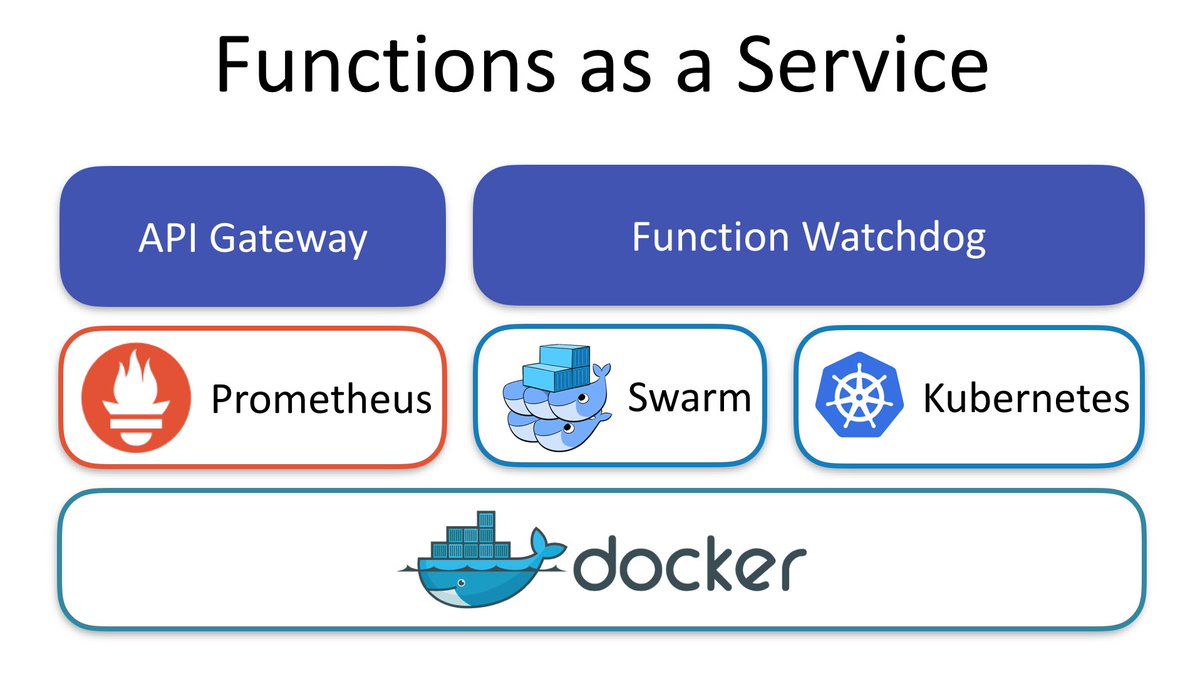
Function Watchdog
- You can make any Docker image into a serverless function by adding the Function Watchdog (a tiny Golang HTTP server)
- The Function Watchdog is the entrypoint allowing HTTP requests to be forwarded to the target process via STDIN. The response is sent back to the caller by writing to STDOUT from your application.
API Gateway / UI Portal
- The API Gateway provides an external route into your functions and collects Cloud Native metrics through Prometheus.
- Your API Gateway will scale functions according to demand by altering the service replica count in the Docker Swarm or Kubernetes API.
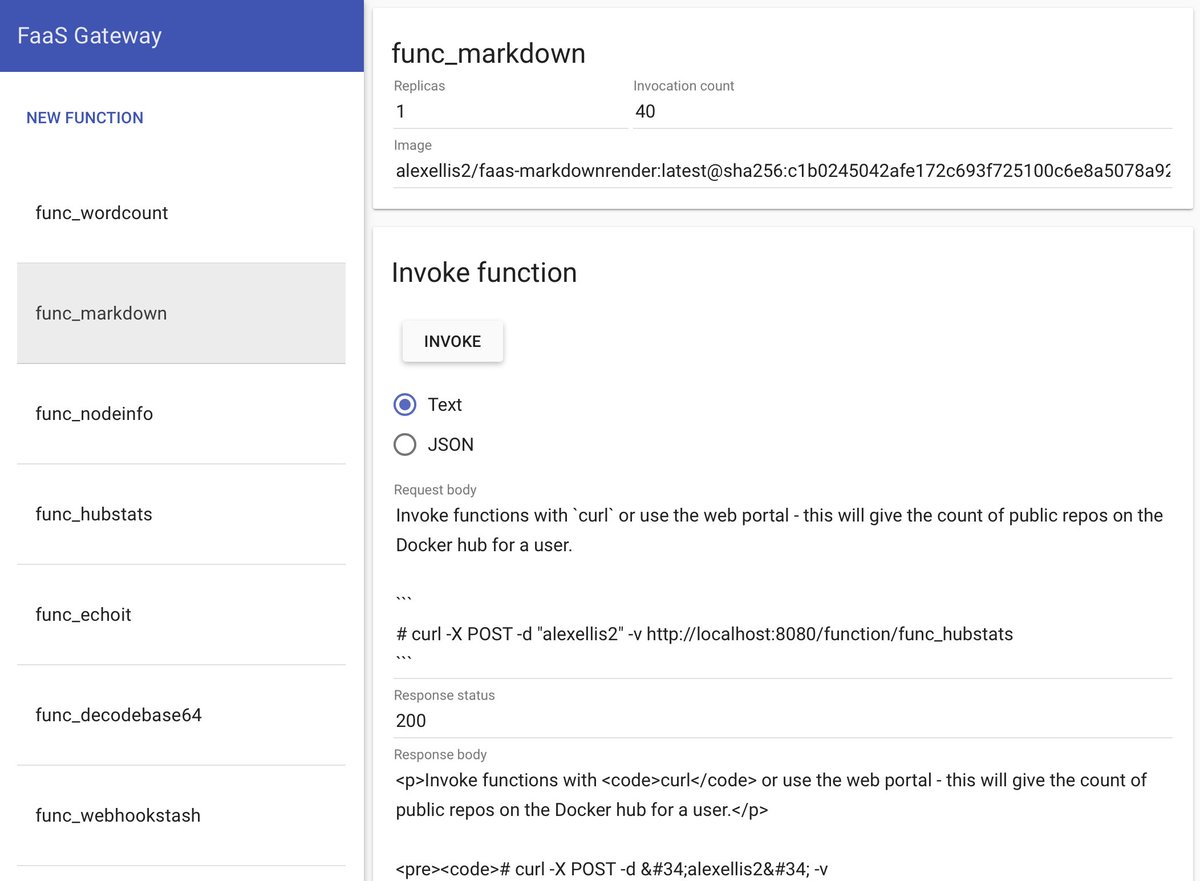
- A UI is baked in allowing you to invoke functions in your browser and create new ones as needed.
The API Gateway is a RESTful micro-service and you can view the Swagger docs here.
CLI
Any container or process in a Docker container can be a serverless function in FaaS. Using the FaaS CLI you can deploy your functions or quickly create new functions from templates such as Node.js or Python.
The CLI is effectively a RESTful client for the API Gateway.
CLI walk-through
Once you have set up OpenFaaS you can follow these instructions:
Let's have a quick look at an example function url-ping which connects to a remote web server and returns the HTTP code from the response. It's written in Python.
import requests

def handle(req):
        r =  requests.get(req, timeout = 1)
        print(req +" => " + str(r.status_code))
handler.py
$ curl -sSL https://cli.openfaas.com | sudo sh
Install the faas-cli which is also available on brew
Clone the samples and templates from Github:
$ git clone https://github.com/alexellis/faas-cli
$ cd faas-cli
Define your functions in YAML - or deploy via the API Gateway's UI.
provider:
  name: faas
  gateway: http://localhost:8080

functions:
  url-ping:
    lang: python
    handler: ./sample/url-ping
    image: alexellis2/faas-urlping
Example function YAML file - url-ping.yaml
$ faas-cli -action build -f ./url-ping.yaml
Build a Docker image using the Python handler in ./sample/url-ping
$ faas-cli -action deploy -f ./url-ping.yaml
Deploy the new image to the gateway defined in the YAML file.
If your gateway is remote or part of a multi-host Swarm - you can also use the CLI to push your image to a remote registry or the Hub with
faas-cli -action push
$ curl -d "https://cli.openfaas.com" http://localhost:8080/function/url-ping/
https://cli.openfaas.com => 200
Test out the function with the URL https://cli.openfaas.com => 200
Sample functions are available in the Github repository in a range of programming languages.
Get started with OpenFaaS
Closing Keynote at Dockercon 2017
Functions as a Service or FaaS was a winner in the Cool Hacks contest for Dockercon 2017.
If you'd like to find the functions I used in the demos head over to the faas-dockercon repository.
Background story
This is my original blog post on FaaS from January: Functions as a Service blog post
TestDrive
Docker Playground
You can quickly start OpenFaaS on Docker Swarm online using the community-run Docker playground: play-with-docker.com (PWD) by clicking the button below:

Docker Swarm
A set of one-line scripts are provided to help you quickly test-drive OpenFaaS on Docker Swarm with a set of sample functions as defined in the provided docker-compose.yml file.
deploy_stack.sh- for OSX/Linux on x86_64deploy_stack.armhf.sh- for Linux on ARM (Raspberry Pi for example)deploy_stack.ps1- for Windows
Kubernetes
Alternatively if you have a Kubernetes cluster you can start here.
Begin the TestDrive with Docker Swarm
Here is a screenshot of the API gateway portal - designed for ease of use.
Community
Have you written a blog about OpenFaaS? Send a Pull Request to the community page below.
If you'd like to join OpenFaaS community Slack channel to chat with contributors or get some help - then send a Tweet to @alexellisuk or email [email protected].
Roadmap and contributing
OpenFaaS is written in Golang and is MIT licensed - contributions are welcomed whether that means providing feedback, testing existing and new feature or hacking on the source. To get started you can checkout the roadmap and contribution guide or browse the open issues on Github.
Highlights:
- New: Kubernetes support via FaaS-netes plugin
- New: FaaS CLI and easy install via
curlandbrew - New: Windows function support
- In development: Asynchronous/long-running OpenFaaS functions via NATS Streaming - Test it using this guide
Example of a Grafana dashboard linked to OpenFaaS showing auto-scaling live in action:
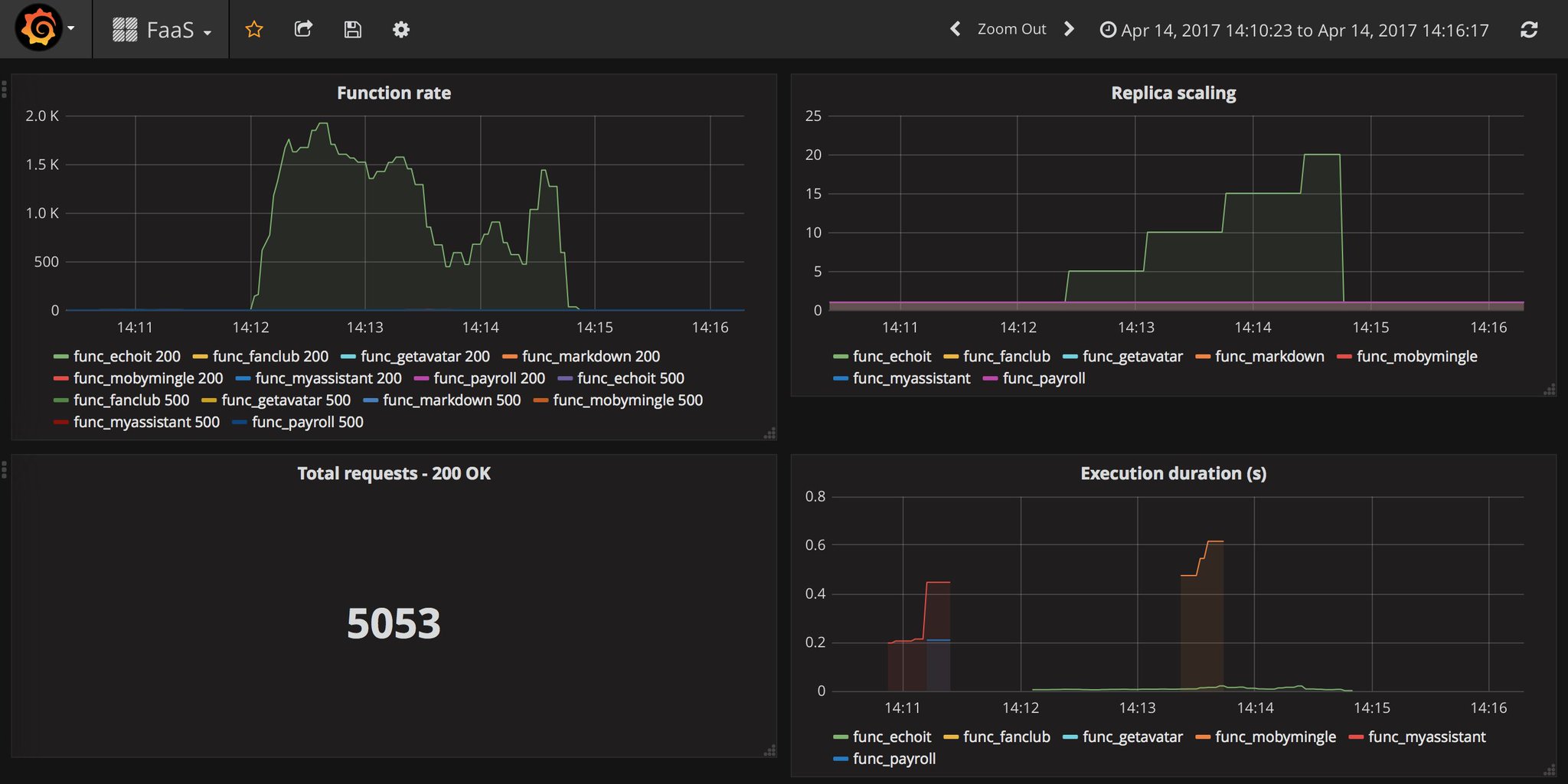
Sample dashboard JSON file available here
Tag summary
Content type
Image
Digest
Size
4.4 MB
Last updated
over 9 years ago
docker pull alexellis2/faas-gateway