chko/docker-pushrm
Docker Push Readme - Update the docs of your container repo on Dockerhub, Quay, Harbor from a file
Image
4
500K+
chko/docker-pushrm repository overview
Docker Push Readme
This is a container image of docker-pushrm, a tool that lets you update the README of your container repo on Dockerhub, Quay or Harbor from a local markdown file.
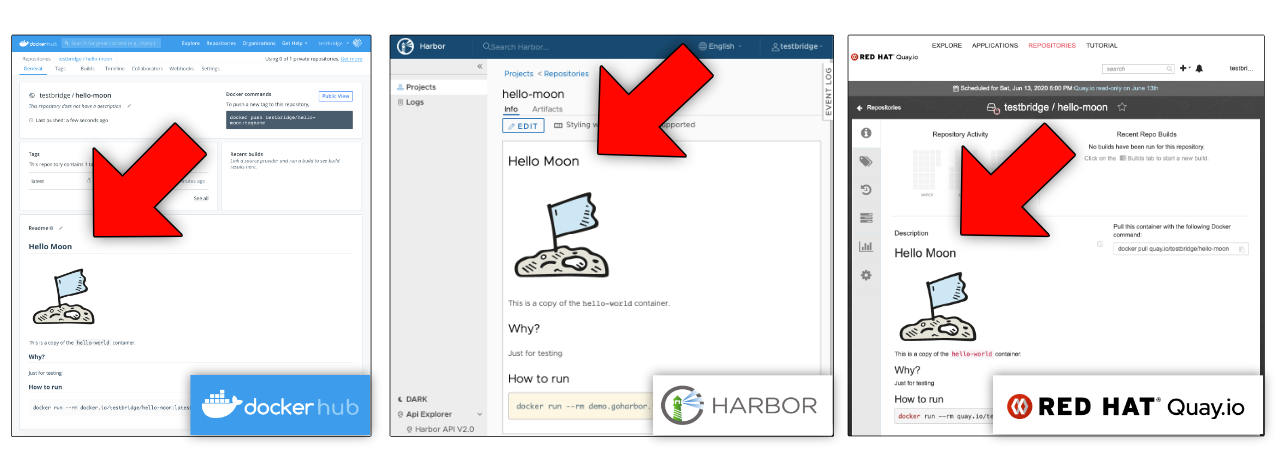
About this tool
Check the full docs for an introduction.
How to use this container image
Examples
Push a README file to Dockerhub
$ ls
README.md

$ docker run --rm -t \
-v $(pwd):/myvol \
-e DOCKER_USER='my-user' -e DOCKER_PASS='my-pass' \
chko/docker-pushrm:1 --file /myvol/README.md \
--short "My short description" --debug my-user/my-repo

...
DEBU content validation successfull, readme successfully pushed to repo server
Let's dissect this a bit:
- we pin to the major version (
v1) of this image (chko/docker-pushrm:v1). Recommended for most use cases. - the README file is in the current working directory on the host. We map this dir as volume to the container (mounted at
/myvol) - we tell docker-pushrm where to find the README file with
--file <path> - our destination repo on Dockerhub is
my-user/my-repo - we pass the credentials for the repo as environment variables to the container (
DOCKER_USERandDOCKER_PASS) - we set
--debugto get additional log output (optional) - we set the short description for the Dockerhub repo with
--short <string>(optional)
Alternatively all params can also get set with environment variables:
$ docker run --rm -t \
-v $(pwd):/myvol \
-e DOCKER_USER='my-user' -e DOCKER_PASS='my-pass' \
-e PUSHRM_PROVIDER=dockerhub -e PUSHRM_FILE=/myvol/README.md \
-e PUSHRM_SHORT='my short description' \
-e PUSHRM_TARGET=docker.io/my-user/my-repo -e PUSHRM_DEBUG=1 \
chko/docker-pushrm:1
Push a README file to a Harbor v2 registry server
Use the --provider harbor2 flag:
$ ls
README.md

$ docker run --rm -t \
-v $(pwd):/myvol \
-e DOCKER_USER='my-user' -e DOCKER_PASS='my-pass' \
chko/docker-pushrm:1 --file /myvol/README.md \
--provider harbor2 --debug demo.goharbor.io/my-project/my-repo
Push a README file to Quay.io or a Quay registry server
- use the
--provider quayflag - use env var
APIKEY__<SERVER>_<DOMAIN>orDOCKER_APIKEYfor apikey credentials
$ ls
README.md

$ docker run --rm -t \
-v $(pwd):/myvol \
-e APIKEY__QUAY_IO='my-apikey' \
chko/docker-pushrm:1 --file /myvol/README.md \
--provider quay --debug quay.io/my-user/my-repo
env vars
| env var | example value | description |
|---|---|---|
DOCKER_USER | my-user | login username |
DOCKER_PASS | my-password | login password |
DOCKER_APIKEY | my-quay-api-key | quay api key |
APIKEY__<SERVER>_<DOMAIN> | my-quay-api-key | quay api key (alternative) |
PUSHRM_PROVIDER | dockerhub, quay, harbor2 | repo provider type |
PUSHRM_SHORT | my short description | set/update repo short description |
PUSHRM_FILE | /myvol/README.md | path to the README file |
PUSHRM_DEBUG | 1 | enable verbose output |
PUSHRM_CONFIG | /myvol/.docker/config.json | Docker config file (for credentials) |
PUSHRM_TARGET | docker.io/my-user/my-repo | container repo ref |
Presedence:
- Params specified with flags take precedence over env vars.
- Login env vars take precedence over credentials from a Docker config file
Tag summary
Content type
Image
Digest
Size
3.7 MB
Last updated
about 4 years ago
docker pull chko/docker-pushrm