honeok/frp repository overview
FRP



FRP is a high-performance reverse proxy focused on NAT traversal, supporting protocols such as TCP, UDP, HTTP, HTTPS, and P2P communication.
It enables you to securely and conveniently expose local services behind a NAT or firewall to the public internet through a relay server with a public IP.
Architecture
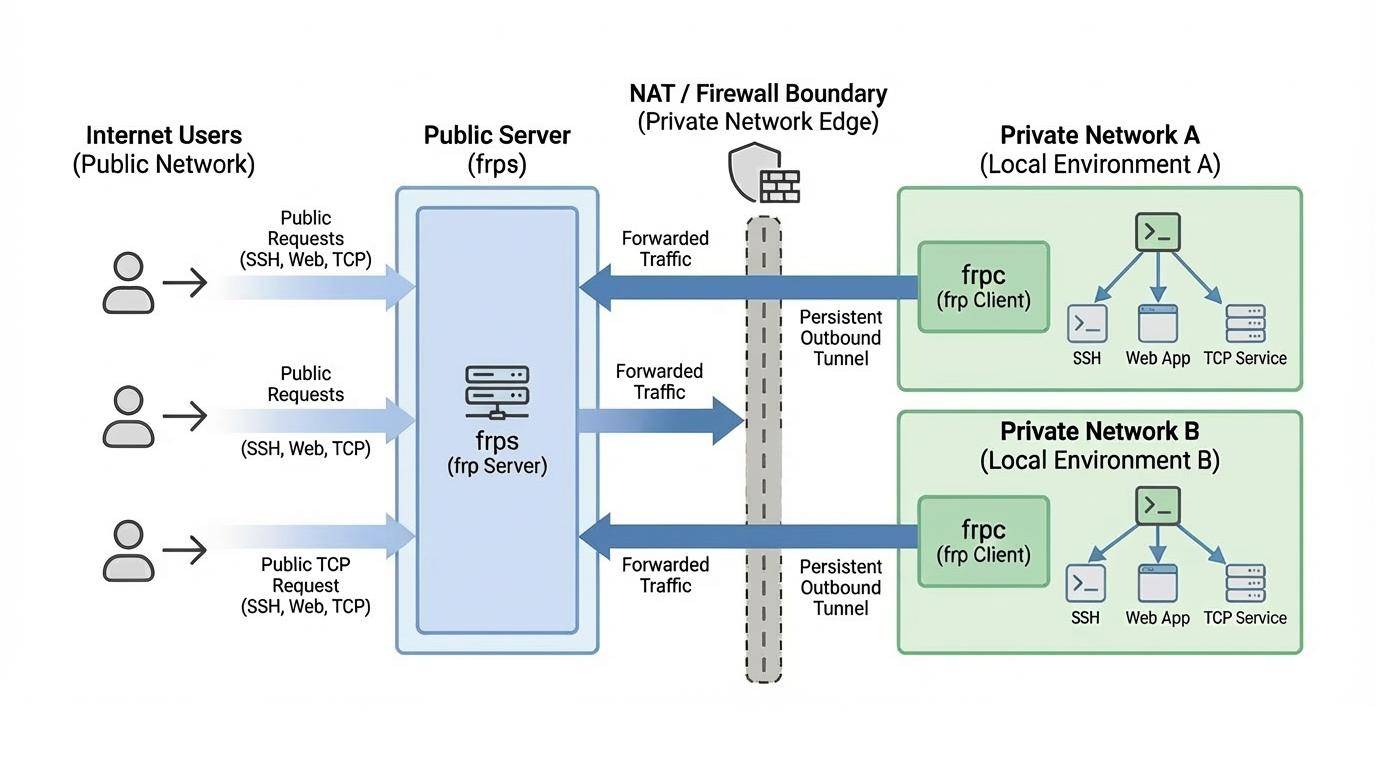
Prepare the host
If you need to install docker by yourself, follow the official installation guide.
Pull the image
This pulls the latest release of FRP.
It can be found at Docker Hub.
docker pull honeok/frp
Start a container
Add the following to your docker-compose.yaml file to start the frp server (frps).
This image is multi-purpose and can also run as an frp client (frpc). To do this, simply change the startup command in your docker-compose.yaml.
command: frpc -c /etc/frp/frpc.toml
For detailed configuration options, please refer to the official frp documentation.
tee docker-compose.yaml >/dev/null <<'EOF'
services:
  frp:
    image: honeok/frp
    container_name: frp
    restart: unless-stopped
    environment:
      - TZ=Asia/Shanghai
    volumes:
      - $PWD/frps.toml:/etc/frp/frps.toml
    command: frps -c /etc/frp/frps.toml
    network_mode: host
EOF
Note: The port you configured must be opened in the firewall.
Tag summary
Content type
Image
Digest
sha256:e3b193c00…
Size
17.5 MB
Last updated
about 1 month ago
docker pull honeok/frp