mastermindzh/subdarr
Subdarr is an auxiliary subtitle downloader for Sonarr and Radarr
10K+
mastermindzh/subdarr repository overview

Subdarr
Subdarr is an auxiliary subtitle downloader for Sonarr and Radarr.
Simply run the container and follow the "connector installation" instructions to automatically download subs for your content!
Links
Table of contents
Installation
Below you'll find the installation instructions for Subdarr. It will go into both installing with and without Docker and finish with the connector installation.
With Docker
To run the barebones container (no volume mapping) use:
docker run --name Subdarr -p 5500:5500 mastermindzh/subdarr
Most people will require volume mounts though. Make sure your volume mounts are the same as those for Sonarr/Radarr!
Sonarr and Radarr use "/tv" and "/movies" by default (respectively).
The following Docker command should work for most people:
docker run --name Subdarr -p 5500:5500 -v /path/to/tvshows/:/tv -v /path/to/movies:/movies mastermindzh/subdarr
Without Docker
Running without docker isn't recommended but it can be done by following the steps below.
- Clone this repo
- Use
pipto install requirements.txt - Run the app with the
python app.pycommand.
Connector installation
For this step you need the "download_subtitles.sh" file.
You can find this file in the "connector" directory or call the 'connector' endpoint (default: http://localhost:5500/connector).
- Copy the
download_subtitles.shfile to a location Sonarr/Radarr can reach - Go to Sonarr/Radarr and click
settings - Click on the
Connecttab - Click the big
"+"sign - Choose
Custom Script - Enter a name and disable
on Grab - Set the "Path" to
/bin/bash - Set the "Arguments" to the path of your
download_subtitles.shfile - Optionally append languages and the Subdarr ip as arguments to the script from step 8. (e.g
/my/path/download_subtitles.sh eng,nld http://192.168.1.6:5500) (defaults are English and localhost, list of all languages) - Click on save to save.
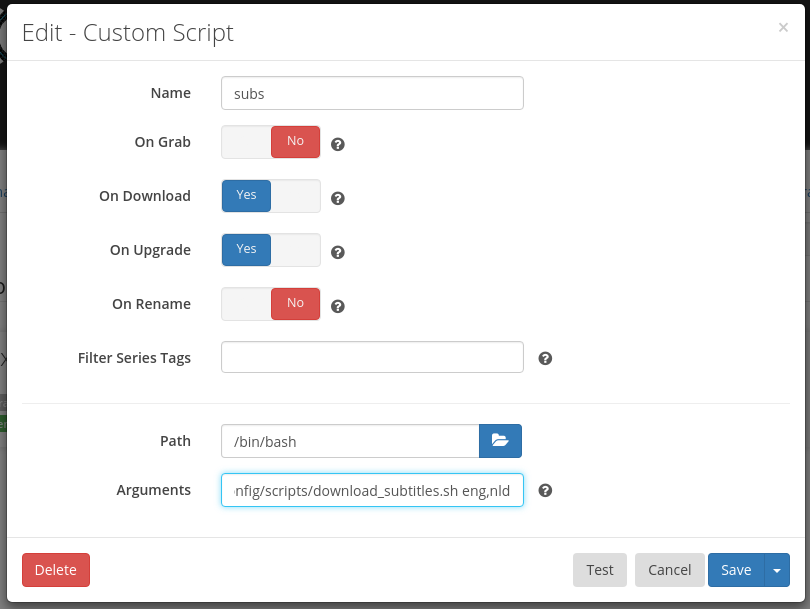
Extending the logger
The logger, by default, does nothing (yay freedom). It is possible to extend the logger if you know how to write Python code. Simply edit the logger/logger.py file and edit what the "log" method does. In the example below I changed the log method to log a separator before and after the actual message.
def log(message):
  """Logs a message to the command line"""
  print("==========")
  print(message)
  print("==========")
If you're running with docker
If you're running with Docker you'll have to copy the contents of logger.py to a folder on your disk and edit that.
To include the logger in your Docker simply add a volume bind when running the container:
-v /my/custom/path/logger.py:/app/logger/logger.py
The complete command will look something like this:
docker run --name Subdarr -p 5500:5500 -v /my/custom/path/logger.py:/app/logger/logger.py mastermindzh/subdarr
scan an entire folder for existing files
To scan an entire folder you have to call the /scan endpoint with the following JSON document (only path is mandatory, defaults to English and 14 days):
{
	"languages": "eng,nld",
	"path":"/movies",
	"age": 14
}
This will give you the following cURL command:
curl --request POST \
  --url http://localhost:5500/scan \
  --header 'cache-control: no-cache' \
  --header 'content-type: application/json' \
  --data '{\n	"languages": "eng,nld",\n	"path":"/movies",\n	"age": 14\n}'
You could automate it with cron or systemd Timers too.
Tag summary
Content type
Image
Digest
Size
196.9 MB
Last updated
over 8 years ago
docker pull mastermindzh/subdarr